How to Review AI-Generated Test Code: A Checklist for QA Engineers
AI writes Playwright tests in seconds, but it invents selectors and weak assertions. Use this checklist before you trust generated test code.
AI coding assistants can produce a complete Playwright test in seconds. That speed is real, and so are the risks. Generated tests can look perfectly professional while clicking elements that do not exist, calling methods that Playwright never had, or asserting something that is always true. This article gives you a practical checklist for reviewing AI-generated test code, so you get the speed without shipping tests you cannot trust.
Why generated tests need extra review
A language model predicts code that looks right. It has not seen your application, your test data or your team's conventions unless you give them to it. The result is code that is often close, but not correct, and the errors are subtle because the code compiles and reads well. Your job shifts from writing every line to verifying every line.
The review checklist
1. Do the locators exist?
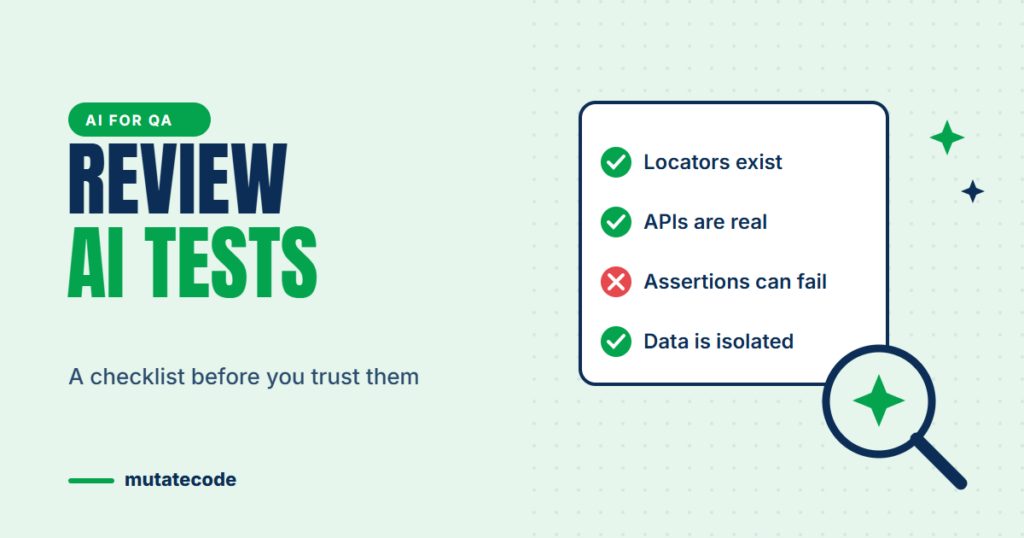
The most common problem is a hallucinated selector: a test ID, label or button name the model guessed. Check each one against the real page, for example with the Playwright Inspector's locator picker. Prefer user-facing locators such as getByRole and getByLabel, and reject long CSS or XPath chains the model invented.
2. Are the APIs real?
Models sometimes mix up libraries or invent convenient methods. For example, there is no page.waitForElement() in Playwright; that name comes from other tools. TypeScript and your editor catch many of these, so always run the code in a typed project rather than pasting it into a plain JavaScript file.
3. Do the assertions actually check something?
Weak assertions are harder to spot than missing ones. Compare these two lines:
// Always passes: a locator object is always "truthy", even if nothing matches
expect(page.getByText('Order confirmed')).toBeTruthy();

// Actually checks the page, and retries until it is true or times out
await expect(page.getByText('Order confirmed')).toBeVisible();
Also watch for assertions that only check the URL or the page title when the test is meant to verify business data, such as an order total or a saved value.
4. Are there hidden timing problems?
Look for waitForTimeout(), missing await keywords and chains of actions without any assertion in between. Replace fixed waits with web-first assertions or explicit response waits.
5. Are the business assumptions correct?
Generated tests encode guesses about how your product should behave: which fields are mandatory, what an error message says, what happens after checkout. Compare every expected result with the requirement or acceptance criteria, not with what seems reasonable.
6. Is the test data safe and independent?
Check that the test creates its own data, uses unique values, cleans up after itself and does not rely on records in a shared environment. Make sure no real customer data, passwords or tokens appear in the code.
7. Does it follow your framework?
A test that works but ignores your page objects, fixtures and folder structure creates maintenance debt. Ask the assistant to use your existing helpers, or refactor the output before merging.
Prove the test can fail
A test that has never failed has not proven anything. After a generated test passes, deliberately break the behaviour it checks:
- Change the expected text in the assertion, or temporarily break the feature in a local environment.
- Run the test again and confirm it fails with a clear message.
- Restore the change.
If the test still passes when the feature is broken, the assertion is not doing its job. We call this habit mutating the test: a few minutes that save hours of false confidence.
Better prompts produce better tests
You review less when you ask better. Give the assistant:
- The relevant HTML or accessibility snapshot, not just a description of the page.
- Your locator rules ("use getByRole and getByLabel, never XPath").
- An existing test from your project as an example of style and structure.
- The exact acceptance criteria to assert.
Protect confidential information
Before pasting code, logs or requirements into an AI tool, check your company's policy. Remove credentials, personal data and internal URLs, and prefer approved enterprise or locally hosted models for sensitive projects.
Key takeaways
- Treat AI-generated tests as a draft from a fast junior colleague: useful, but always reviewed.
- Verify every locator and API against the real application and documentation.
- Reject assertions that cannot fail, such as
toBeTruthy()on a locator. - Break the feature on purpose to prove the test detects it.
- Feed the assistant real context and keep confidential data out of prompts.
Frequently asked questions
Can AI write Playwright tests?
Yes. AI assistants can generate Playwright tests, page objects and test data quickly. The output still needs review, because models can invent selectors, use methods that do not exist and write assertions that always pass.
What is a hallucinated selector?
It is a locator that an AI model made up, such as a test ID or button name that does not exist in your application. Tests with hallucinated selectors fail immediately or, worse, match the wrong element.
How do I know if a generated test is reliable?
Run it several times, check every locator and assertion, and then break the feature it tests. A reliable test passes consistently when the feature works and fails clearly when it does not.
Will AI replace automation testers?
AI changes the job rather than removing it. Engineers who can design frameworks, judge test quality and verify generated code become more valuable, because someone has to decide what is worth testing and whether the tests can be trusted.
AI-assisted test automation, including verifying generated code and detecting hallucinated APIs, is part of both our Playwright Modern Automation Engineer and Software Test Automation & AI Engineering programs.