Run Playwright Tests in GitHub Actions with Sharding (Step by Step)
Cut long Playwright runs by splitting them across machines in GitHub Actions, then merge every shard into one HTML report. Full workflow included.
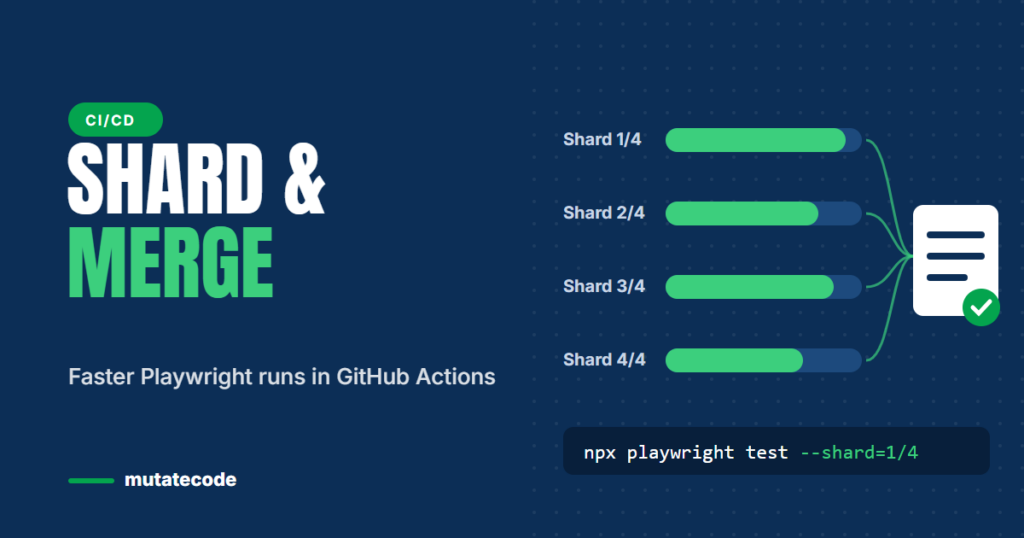
When a Playwright suite grows to hundreds of tests, a single CI machine becomes the bottleneck. Pull requests wait twenty or thirty minutes for feedback, and developers start skipping the checks. Sharding solves this by splitting the suite across several machines that run at the same time. This guide shows how to set up sharding in GitHub Actions and how to merge the results back into a single HTML report.
Workers vs shards
Playwright has two levels of parallelism, and it helps to keep them apart:
| Workers | Shards | |
|---|---|---|
| What runs in parallel | Test files (or tests) on one machine | Parts of the suite on different machines |
| Limited by | CPU and memory of one machine | How many CI jobs you can run at once |
| Configured with | workers in the config or --workers | --shard=1/4 on the command line |
You can combine both: four shards, each running two workers, gives eight tests in progress at the same time.
Step 1: Prepare the Playwright config
Two settings make sharding work well:
import { defineConfig } from '@playwright/test';

export default defineConfig({
  fullyParallel: true,                              // split individual tests, not just files
  retries: process.env.CI ? 2 : 0,
  reporter: process.env.CI ? 'blob' : 'html',       // blob reports can be merged later
  use: {
    baseURL: process.env.BASE_URL ?? 'http://localhost:3000',
    trace: 'on-first-retry',
  },
});
fullyParallel: truelets Playwright distribute individual tests across shards, so one large file does not leave a single shard running long after the others finish.- The blob reporter writes a raw report that can be merged with the reports of the other shards.
Step 2: Create the workflow
Save the following as .github/workflows/playwright.yml. The matrix creates four jobs, and each job runs one quarter of the suite.
name: Playwright tests

on:
  pull_request:
  push:
    branches: [main]

jobs:
  test:
    runs-on: ubuntu-latest
    timeout-minutes: 30
    strategy:
      fail-fast: false              # let every shard finish so you see all failures
      matrix:
        shard: [1, 2, 3, 4]
    steps:
      - uses: actions/checkout@v4
      - uses: actions/setup-node@v4
        with:
          node-version: lts/*
      - run: npm ci
      - run: npx playwright install --with-deps
      - name: Run shard ${{ matrix.shard }} of 4
        run: npx playwright test --shard=${{ matrix.shard }}/4
        env:
          BASE_URL: ${{ secrets.STAGING_URL }}
      - name: Save this shard's report
        if: ${{ !cancelled() }}
        uses: actions/upload-artifact@v4
        with:
          name: blob-report-${{ matrix.shard }}
          path: blob-report
          retention-days: 1

  report:
    if: ${{ !cancelled() }}
    needs: test
    runs-on: ubuntu-latest
    steps:
      - uses: actions/checkout@v4
      - uses: actions/setup-node@v4
        with:
          node-version: lts/*
      - run: npm ci
      - name: Collect all shard reports
        uses: actions/download-artifact@v4
        with:
          pattern: blob-report-*
          path: all-blob-reports
          merge-multiple: true
      - name: Merge into one HTML report
        run: npx playwright merge-reports --reporter html ./all-blob-reports
      - uses: actions/upload-artifact@v4
        with:
          name: playwright-report
          path: playwright-report
          retention-days: 14
Step 3: Read the merged report
When the run finishes, open the workflow summary and download the playwright-report artifact. Unzip it and open index.html, or run npx playwright show-report inside the unzipped folder. You get one report covering every shard, including traces for retried tests.
How many shards should you use?
Start by measuring. Divide your current total run time by the time you are willing to wait for feedback, then round up. A few practical points:
- Each shard repeats setup work (checkout,
npm ci, browser install), so very small shards waste time. - Check how many concurrent jobs your GitHub plan allows before choosing a large number.
- If one shard is consistently slower, look for a few very slow tests and make sure
fullyParallelis enabled.
Keep secrets and environments out of the code
Store URLs, test accounts and API keys as GitHub Actions secrets and read them through environment variables, as shown with BASE_URL above. Never commit credentials to the repository, and use dedicated test accounts that can be reset.
Key takeaways
- Workers parallelise on one machine; shards spread the suite across several.
- Use
fullyParallel: trueand the blob reporter for balanced, mergeable shards. - A GitHub Actions matrix runs one job per shard.
npx playwright merge-reportscombines all shards into one HTML report.- Choose the shard count from real timing data and your CI concurrency limits.
Frequently asked questions
What is sharding in Playwright?
Sharding splits a test suite into parts that run on separate machines at the same time. You run each part with npx playwright test --shard=x/y, where y is the number of shards and x is the part this machine runs.
How do I combine reports from multiple shards?
Use the blob reporter in CI, upload each shard's blob-report folder as an artifact, download them all in a final job and run npx playwright merge-reports --reporter html on the combined folder.
Should I cache Playwright browsers in GitHub Actions?
It is generally not recommended. Restoring a large browser cache takes about as long as downloading the browsers, and the operating system dependencies still need installing. npx playwright install --with-deps keeps things simple and reliable.
What is the difference between workers and shards?
Workers are parallel processes on one machine. Shards are portions of the suite run on different machines. You can use both together for maximum speed.
CI/CD, Docker and running Playwright at scale are covered in Chapters 7 and 9 of our Playwright Modern Automation Engineer program. Before scaling, make sure your suite is stable: read Flaky Tests in Playwright: How to Find and Fix the Root Cause.